ScrapwardenBETA
BETAFree & open source · v1.0.0 beta 1

Your Rust server,
under control

Scrapwarden is a free, self-hosted web panel that installs, runs, moderates and grows your Rust server. Live map, F7 report tickets, in-game staff tools, a Discord bot and Tebex delivery, all in one place.

  • Free forever (MIT)
  • Windows & Linux
  • Your own or rented servers
  • EN · ES · PT · FR

One panel instead of five tools. No more juggling:

  • Paid RCON dashboard
  • Separate Discord bot
  • Store plugin
  • Wipe scripts
  • Manual installs
01 / Just another night

Your server is full. You're asleep. And someone just loaded something they shouldn't have.

Too many headshots

78% headshots in the last 50 shots, and one pistol kill at 212 metres. Nobody on the server has noticed yet.

Abnormal accuracyxX_Aimbot_Xx · 78% headshots
HIGH

The panel notices

The alert pops up in Watch and lands in your team's Discord channel within seconds, with the player, the reason and their history. Two F7 reports join the same ticket.

#rust-alertsScrapwarden: abnormal accuracy · xX_Aimbot_Xx
SENT

Your mod checks it

From their phone they open the player's profile: a two-day-old account, a VPN, and the shared ban list says he was banned on a friend's server last week. No doubt left.

Banned on another serverShared ban list · RustLand
HIGH

Gone. Everywhere.

One click: banned and kicked, with the reason in the activity log. The ban reaches all your servers at once, and the players who reported him get a thank-you in game.

Banned by marta (moderator)Reason: aimbot · 3 servers · logged 03:52
DONE

And the night goes on

Scheduled restart with chat warnings, backup saved and server updated. All on its own.

04:00 restartBackup backup-04-00.zip · update installed
OK

You're still
asleep.

That's Scrapwarden: the admin teammate that never gets tired, never gets distracted and never forgets.

What it does

Everything a Rust admin needs

From the first download to wipe day, with your mods and admins working from the same place.

Set up

Ready in minutes, no command line.

  • SteamCMD and server in one click
  • Oxide or Carbon, or back to vanilla
  • Progress bar with speed and ETA
  • Or import yours, or connect to a rented one

Run

Keep it online and fast.

  • Live console, FPS, CPU and RAM
  • Restarts with in-game countdown
  • Wipe planner that knows forced wipe
  • Backups, stats and startup tips

Moderate

Catch problems before players leave.

  • F7 reports become tickets
  • In-game /staff menu
  • Chat filter that blocks before sending
  • Cheat alerts and Steam checks

Grow

Bring players in and keep them.

  • Public server page with Connect
  • Two-way Discord bot
  • Tebex delivery, no plugin
  • VIP that expires on its own

Take a look

Real screens, no mockups

localhost:8080
Moderation

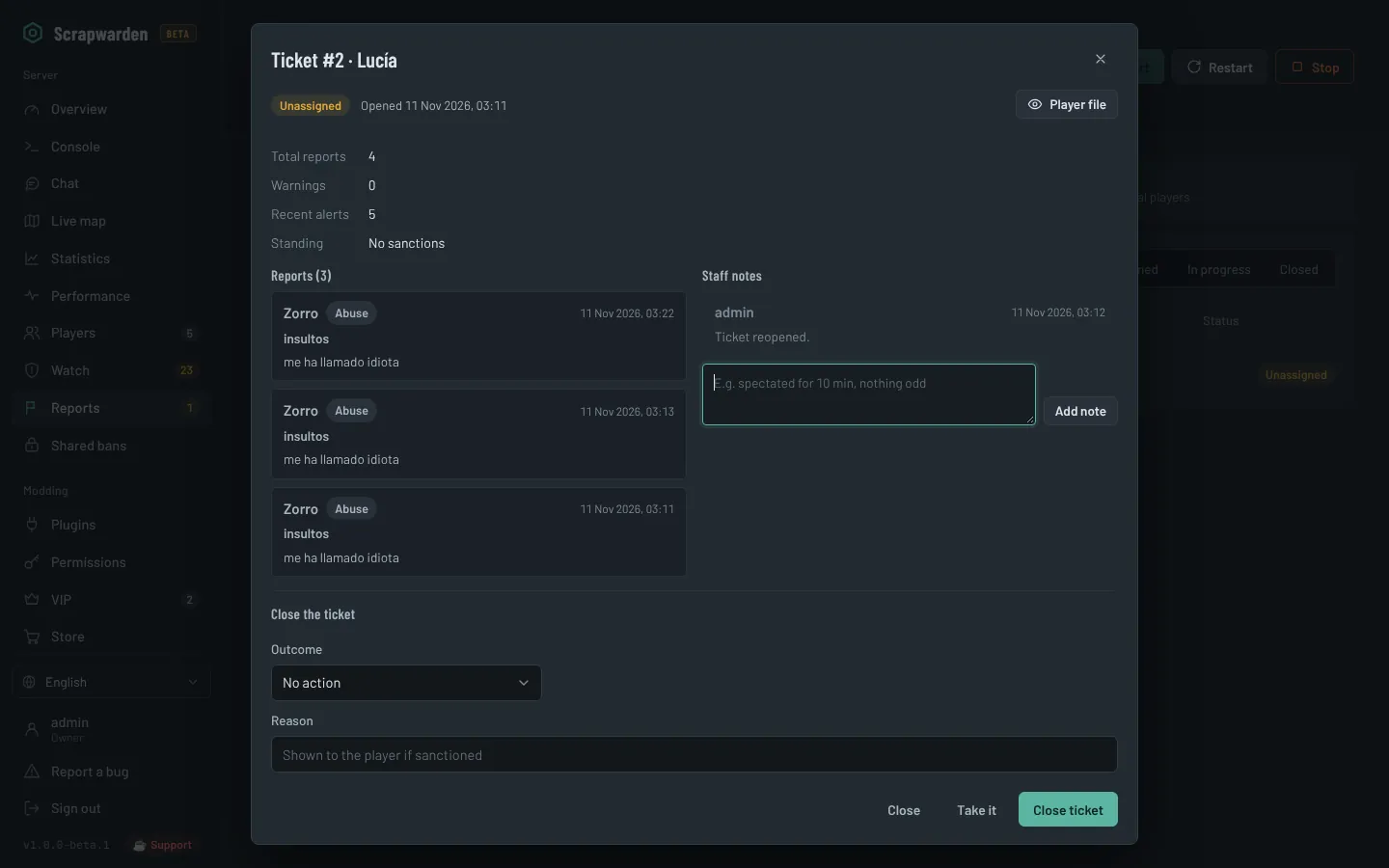
Every F7 report becomes a ticket

Reports about the same player are grouped, so you see at a glance who five people are complaining about. Take the ticket, leave notes for your team and close it with a sanction.

  • Warn, mute, kick, temp ban or ban in one click
  • Reporters get a private "thank you" in game
  • /tickets in Discord for your staff
localhost:8080/#tickets
F7 report ticket with reports, staff notes and sanction options
In-game staff

Your mods work without leaving Rust

Add someone as moderator or admin in the panel and they type /staff in game. A window with players, reports and world controls opens, and every action lands in the activity log.
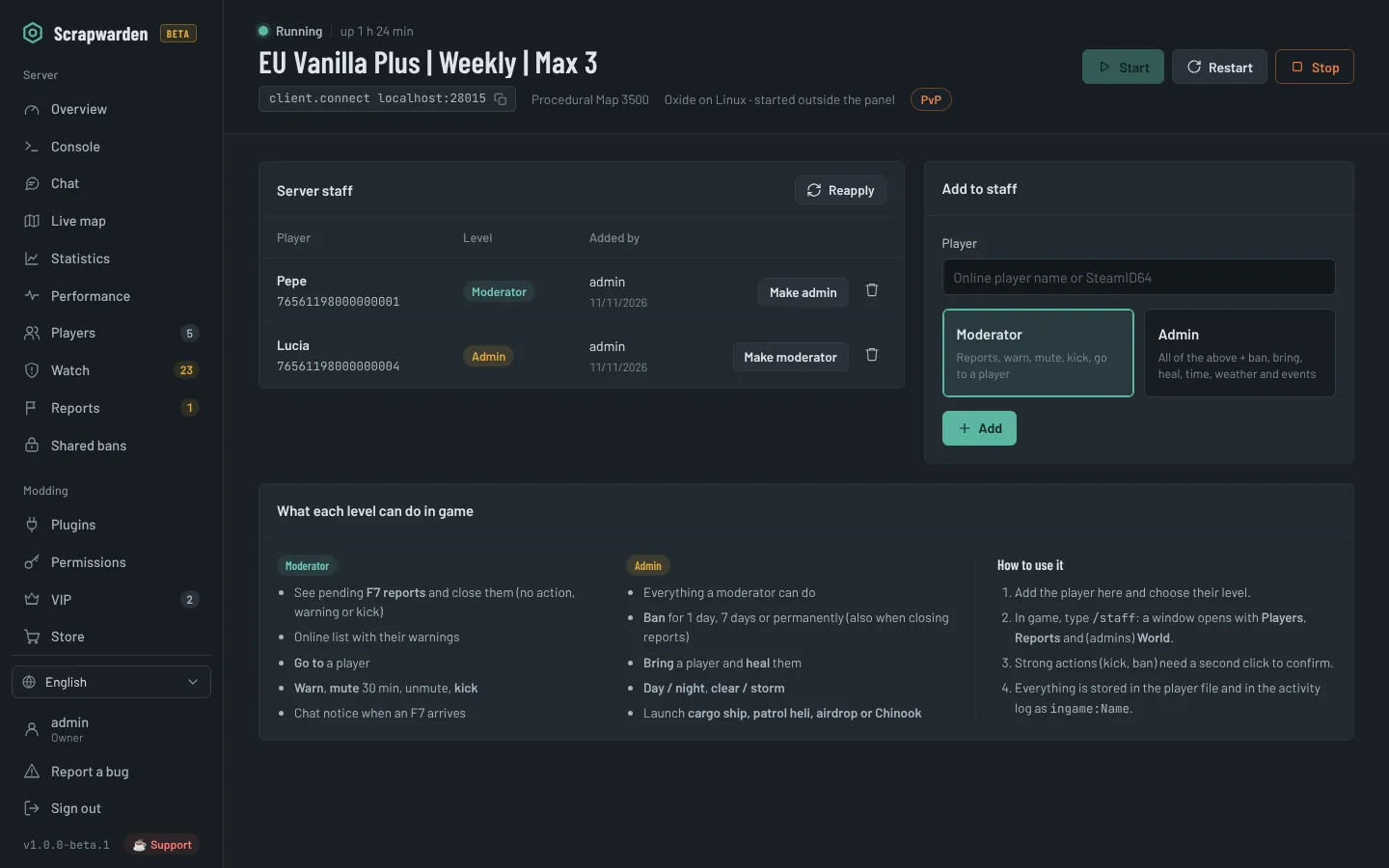
  • Moderators: reports, warn, mute, kick, teleport to
  • Admins: bans, bring, heal, time, weather, events
  • Nobody needs the RCON password
localhost:8080/#staff
In-game staff settings with moderator and admin levels
Monetization

Tebex purchases delivered automatically

Paste your Tebex secret key and the panel runs each package's commands over RCON. No Tebex plugin and no open ports. Offline players get their items when they join.
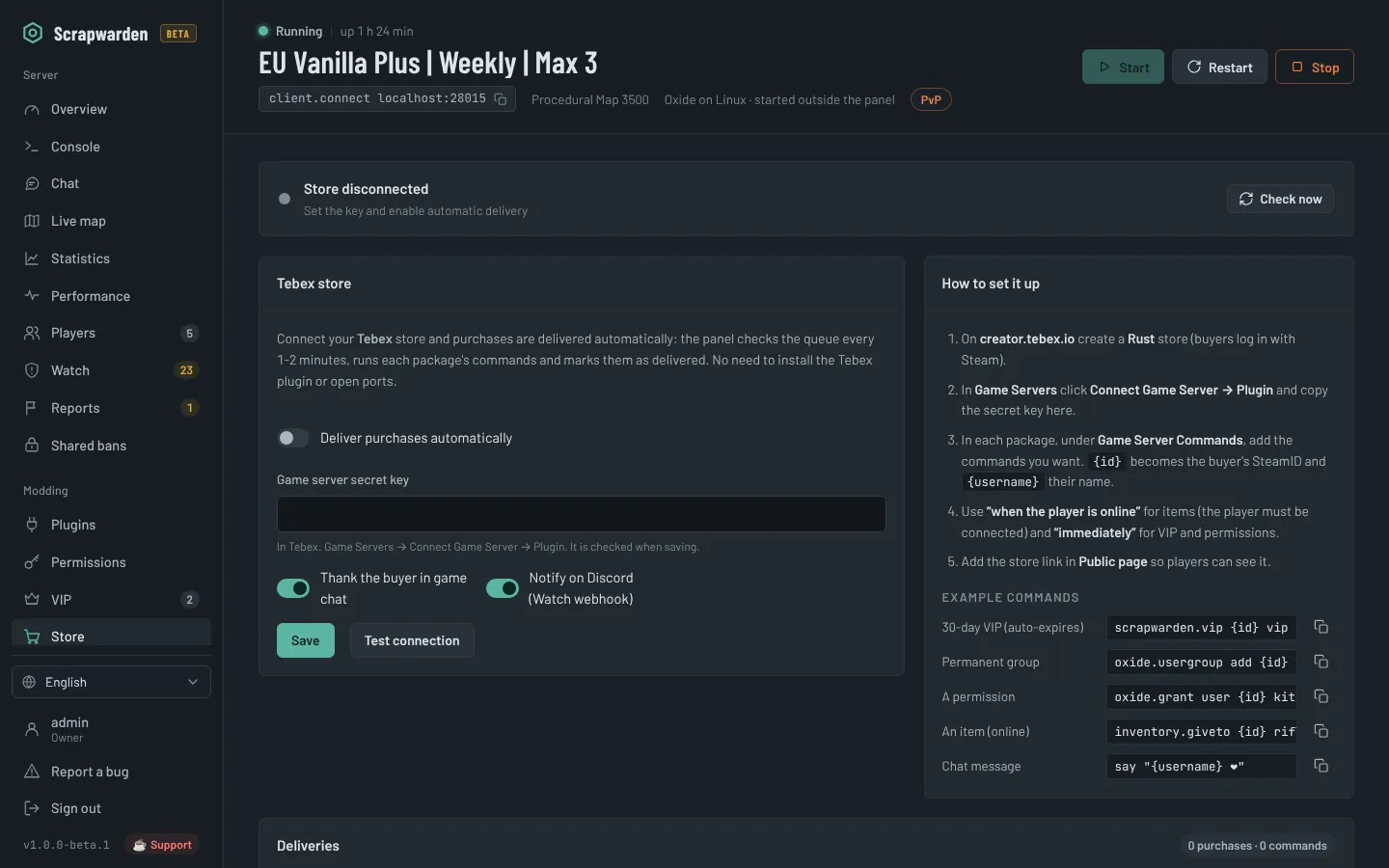
scrapwarden.vip {id} vip 30 # 30-day VIP that removes itself
localhost:8080/#store
Tebex store connection and delivery log
For your players

A public page for your server

Share one link with status, a Connect with Steam button, the wipe countdown, rates, activity, the map and your rules. It never shows player positions, IPs or SteamIDs.
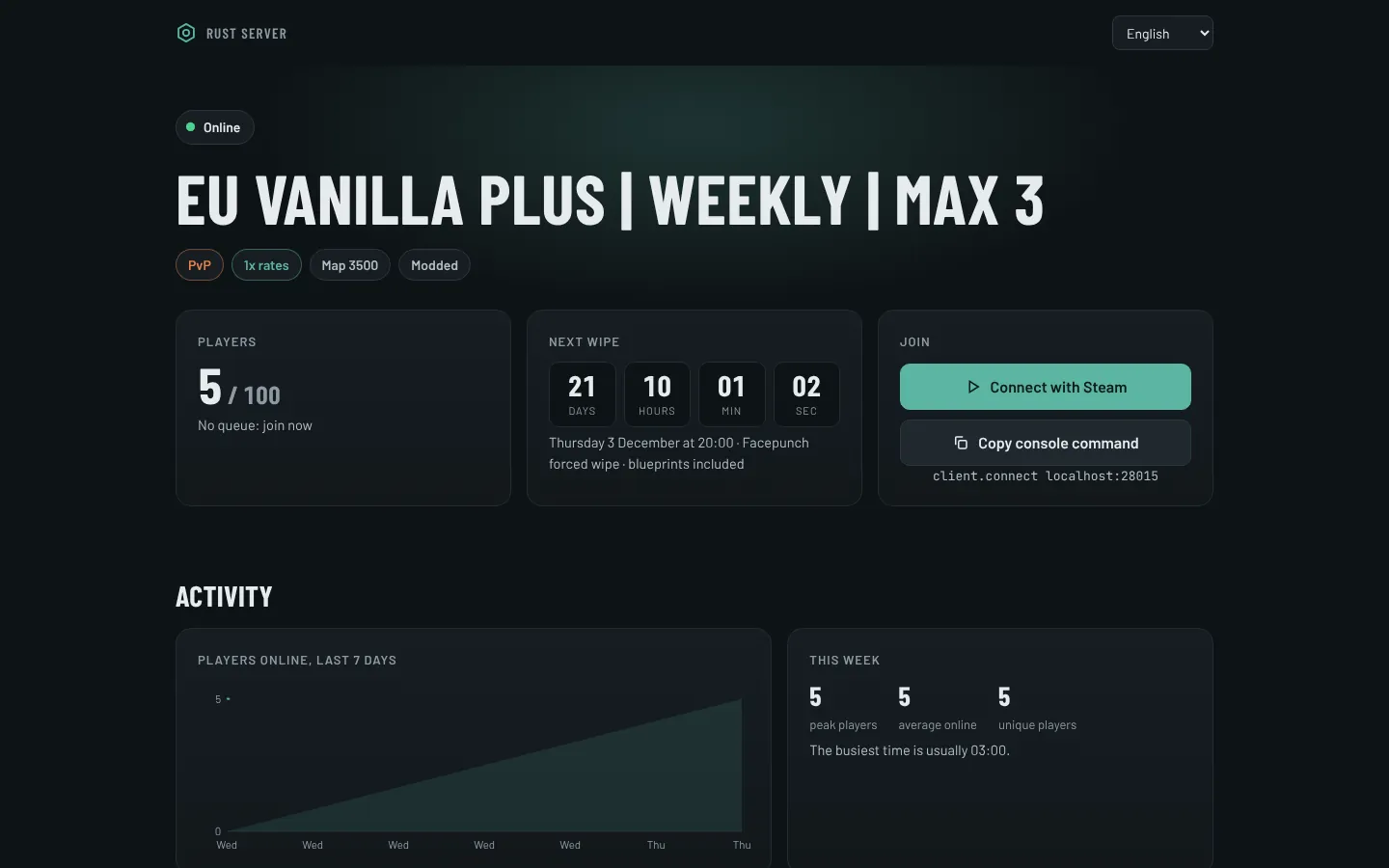
  • In 4 languages, picked automatically
  • Links to your Discord and store
your-server:8080/server
Public server page with status, wipe countdown and connect button

Live map

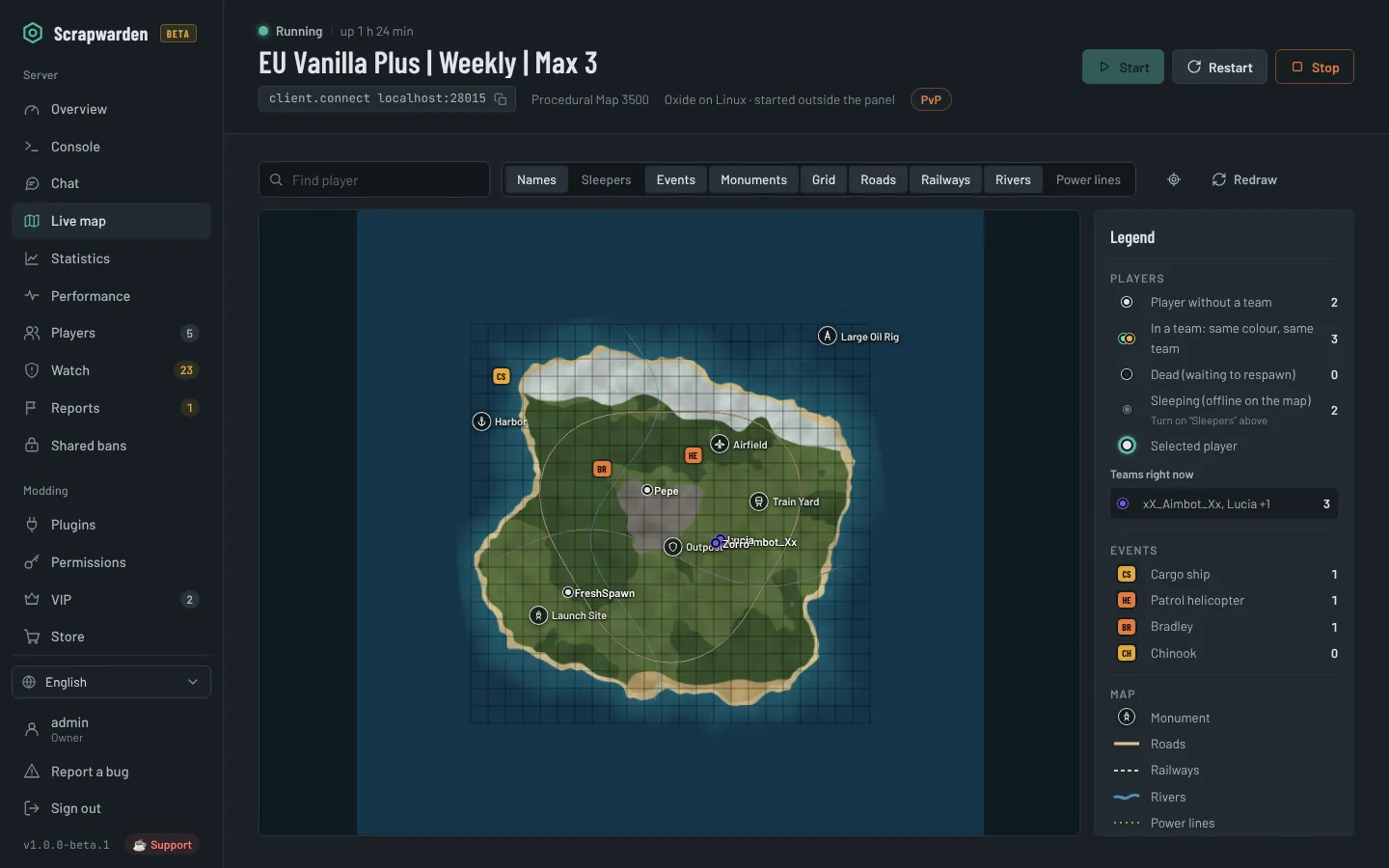
Teams, sleepers, cargo, heli, Bradley, roads, rails, rivers and grid.

Wipe planner

Forced wipe plus weekly or biweekly, with warnings, backup and new seed.

Rates in one click

PvP/PvE, gather, craft, decay, time of day, weather and events.

Cheat watch

Headshot rates, impossible distances, antihack, ban evasion, shared IPs.

Discord bot

Chat bridge, status, players, wipe, and staff commands. No extra installs.

Team and roles

Owner, admin, moderator and viewer, with 2FA and a full activity log.

The full list

Every feature in the panel

Free, with nothing locked behind a paywall.

Install & setup

  • SteamCMD and Rust in one click (public, staging or aux branch)
  • Oxide or Carbon, or back to vanilla without losing plugins
  • Windows and Linux, with progress, speed and time left
  • Import a server you already have (reads your .bat/.sh and server.cfg)
  • Rented servers over RCON, with optional FTP/SFTP for plugins

Server & performance

  • Dashboard: players, queue, FPS, entities, CPU and RAM
  • Live console with filters and command history
  • Server settings: name, map, seed, size, slots and header image
  • Scheduled restarts with in-game countdown and auto-update
  • ZIP backups and one-click restore
  • Wipe planner that knows the forced wipe, with BP wipes and new seed
  • Startup timing, low-FPS, high-RAM and frozen-server alerts
  • Statistics: players over time, peak hours, new vs returning, rankings

Players & map

  • Live map with teams, sleepers, events, monuments, roads and grid
  • Kick, ban, give items, owner and moderator by SteamID
  • Inventory viewer with real item icons (remove or clear items)
  • Teams, team-size limit alerts and shared tool cupboards
  • Player file: names, history, notes, warnings and Steam data

Moderation & security

  • F7 reports become tickets: assign, sanction and thank the reporters
  • In-game /staff menu for your mods and admins
  • Chat history, private messages and a filter that blocks before sending
  • Warnings with automatic escalation, timed mutes and temp bans
  • Cheat watch: headshot rate, impossible distances, antihack, kill streaks
  • Steam checks: VAC, recent game bans, account age, private profile, hours
  • VPN, proxy, hosting-IP and country detection
  • Shared bans across all your servers (Rust Centralized Banning)
  • Ban evasion and shared-IP alerts

Community & store

  • Public server page with Connect button, wipe countdown and rates
  • Two-way Discord bot with slash commands for players and staff
  • Tebex purchases delivered over RCON, no Tebex plugin
  • VIP that expires on its own, with queue priority
  • Rates, PvP/PvE, time of day, weather and events in one click

Plugins & permissions

  • Search uMod and install in one click, or upload a .cs file
  • Enable, disable, reload, JSON config editor and update checks
  • Grant permissions and manage groups

Panel & team

  • Owner, admin, moderator and viewer roles
  • Two-factor authentication with recovery codes
  • Activity log of who did what
  • English, Spanish, Portuguese and French, with a built-in wiki
  • Update notifications and a Report a bug button
  • Runs on your machine: no account, no ads, no tracking

Why self-hosted

Your server, your data, your rules

No subscription

Free and open source under the MIT license. No paywalled features, no ads.

Your data stays home

Chat logs, player history and keys live on your machine, not on someone else's cloud.

Made for Rust

Built around how Rust servers really work: wipes, F7, teams, Oxide and Carbon.

Get started

Up and running in three steps

  1. Download

    Grab the latest zip from GitHub Releases and extract it.

  2. Run the installer

    It installs Node.js and the dependencies and opens the firewall ports for you.

  3. Open the panel

    Go to http://localhost:8080, create your account and click Install server. The built-in wiki guides you from there.

PowerShell


Already have a server? Import its folder without reinstalling, or connect to a rented one over RCON. Both options are at the top of the Install screen.

Needs 64-bit Windows 10/11, Windows Server 2019+, Ubuntu 22.04/24.04 or Debian 12, Node.js 18+, about 12 GB of free RAM and 20 GB of disk.

Questions

Frequently asked

Is it really free?

Yes. Scrapwarden is open source under the MIT license: no subscription, no paid tier and no ads. If it helps you, you can support development on Ko-fi.

Do I need Oxide or Carbon?

Not for the basics: installing, console, players, chat, restarts, wipes, statistics, the Discord bot and the public page work on vanilla. The live map, inventories, F7 tickets, /staff, rates and cheat detection need Oxide or Carbon; the panel installs its companion plugin automatically.

Does it work with a rented server?

Yes. Run Scrapwarden on your PC or any machine and use remote mode: enter the IP, RCON port and password from your host. Console, players, chat, moderation, F7 tickets, /staff, statistics, Discord, Tebex, VIP and rates all work over RCON. Add your host's FTP or SFTP details and plugins work too, with the companion plugin uploaded for you. Installing, backups and wipes stay with your host.

I already have a server. Do I have to reinstall it?

No. Choose "I already have one here", point to its folder and Scrapwarden reads your start script to keep the same ports, identity, RCON password, map and plugins. If it is already running, the panel connects to it.

Is it safe to open to the Internet?

Passwords are hashed with scrypt, two-factor authentication is available and every action is logged. For remote access, put it behind HTTPS (Caddy or Nginx) or use a VPN. The RCON port never needs to be opened.

What does "beta" mean here?

Everything works, but it's new and you may find bugs. Use the Report a bug button in the panel: it opens GitHub with the technical details already filled in. The panel tells you when a new version is out.

Is it affiliated with Facepunch?

No. Scrapwarden is an independent community project. Rust is a trademark of Facepunch Studios.

Open source

Built by an admin, for admins

Scrapwarden is made in spare time and will stay free. A star, a bug report or a coffee all help it keep up with every Rust update.